AI Visibility Guide
AI Crawlers: Complete List, Robots.txt Rules and Which Ones to Allow
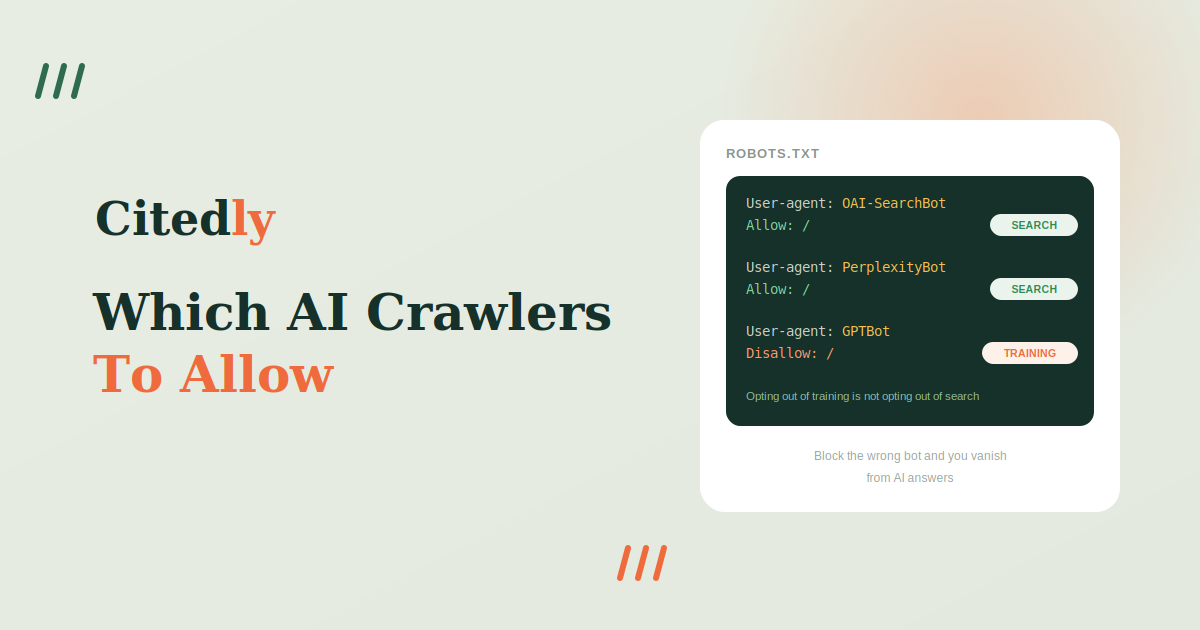
TL;DR: AI crawlers are the bots that read your website for AI products, and they do three different jobs: indexing you for AI search, fetching a page when a user asks something, and collecting training data. The distinction matters, because blocking the wrong one removes you from AI answers while blocking the right one only opts you out of model training. This page lists every major crawler, what each does, and the exact robots.txt lines to allow or block it.
What Are AI Crawlers?
AI crawlers are automated agents that AI companies use to discover, fetch or collect web content. They identify themselves with a user agent name such as OAI-SearchBot, PerplexityBot or GPTBot, and most of them respect the rules in your robots.txt file.
They do not all do the same job, and that is the part most guides skip. A search crawler builds the index an assistant retrieves from when it answers a question. A user-triggered fetcher opens one specific page because a person asked something that needs it. A training crawler collects public text that may be used to develop future models.
That distinction is why adding Disallow: / for every bot with "AI" in its name can backfire. It is possible to decline model training while still being fully visible in AI search, and for most businesses that is exactly the right setting.
| Job | What it does | What blocking it costs you |
|---|---|---|
| Search indexing | Builds the index an AI assistant retrieves from | You disappear from that product's cited answers |
| User-triggered fetch | Loads one page because a user asked a question | The assistant cannot open your page for that user |
| Model training | Collects text used to train future models | Usually nothing in search, but no training exposure |
For the wider picture of what being cited involves, see what AI citations are.
The Complete AI Crawler Reference Table
This is every major crawler in one place, with its job and whether to allow it if your goal is being named in AI answers. Each row reflects the provider's own documentation as of the date in the last column.
| Company | Bot or token | Job | Allow for visibility? | Last verified |
|---|---|---|---|---|
| OpenAI | OAI-SearchBot | ChatGPT search | Yes | Oct 2026 |
| OpenAI | ChatGPT-User | User fetch | Yes | Oct 2026 |
| OpenAI | GPTBot | Training | Optional | Oct 2026 |
| OpenAI | OAI-AdsBot | Ad landing page checks | If advertising | Oct 2026 |
| Anthropic | Claude-SearchBot | Search relevance | Yes | Oct 2026 |
| Anthropic | Claude-User | User retrieval | Yes | Oct 2026 |
| Anthropic | ClaudeBot | Training | Optional | Oct 2026 |
| Perplexity | PerplexityBot | Search | Yes | Oct 2026 |
| Perplexity | Perplexity-User | User retrieval | Yes | Oct 2026 |
| Googlebot | Search, feeds AI Overviews | Yes | Oct 2026 | |
| Google-Extended | Gemini training and grounding control | Depends, see below | Oct 2026 | |
| GoogleOther | Internal research | Optional | Oct 2026 | |
| Apple | Applebot | Spotlight, Siri, Safari | Yes | Oct 2026 |
| Apple | Applebot-Extended | Training opt-out control | Optional | Oct 2026 |
| Microsoft | Bingbot | Bing and Copilot | Yes | Oct 2026 |
| Meta | meta-webindexer | Meta AI search | Yes | Oct 2026 |
| Meta | meta-externalagent | Training | Optional | Oct 2026 |
| Meta | meta-externalfetcher | User-requested fetch | Yes | Oct 2026 |
| Common Crawl | CCBot | Open web dataset | Optional | Oct 2026 |
| ByteDance | Bytespider | Crawling for AI | Optional | Oct 2026 |
| Amazon | Amazonbot | Amazon services and AI | Optional | Oct 2026 |
Crawler names and policies change. Check the provider documentation linked throughout this page before writing a rule you depend on.
Which AI Crawlers Does OpenAI Run?
OpenAI runs four crawlers with independent controls. OAI-SearchBot is the one OpenAI tells publishers to allow if they want their site eligible to appear in ChatGPT search results.
These are the names and jobs from OpenAI's crawler documentation.
| User agent | Job | Allow it? |
|---|---|---|
| OAI-SearchBot | Eligibility for ChatGPT search results | Yes |
| ChatGPT-User | Visits a page when a user's question needs it | Yes |
| GPTBot | Collects content for training OpenAI's models | Your choice |
| OAI-AdsBot | Checks landing pages submitted as ads | Yes, if you run ads |
Two details from OpenAI's documentation are worth knowing. ChatGPT-User is not used to decide whether your content appears in search, so allowing it does not substitute for allowing OAI-SearchBot. And robots.txt changes can take around 24 hours to take effect, so do not judge a fix the same day.
Allowing the crawler makes you eligible, not guaranteed. What happens after retrieval is a separate problem, covered in how to get cited by ChatGPT.
Which Crawlers Does Google Use for AI?
Google does not run a separate AI search crawler. Googlebot does the crawling, and a second token called Google-Extended controls what Google may do with what Googlebot already collected.
This is the most misunderstood entry on the list, so it is worth being precise.
What Does Google-Extended Actually Control?
Google-Extended is a control token, not a crawler. It has no user agent string of its own. Per Google's crawler documentation, it governs two things: whether your content may be used to train future Gemini models, and whether it may be used for grounding, where Search index content is supplied to the model at prompt time in Gemini apps and Vertex AI.
Google states that it does not affect your site's inclusion in Google Search or your ranking.
So Google-Extended is not a straight training switch. Blocking it costs you no Google Search visibility, but it can also stop your content being used to ground answers in Gemini. If being surfaced in Gemini matters to you, do not treat it as equivalent to GPTBot.
What About AI Overviews?
AI Overviews draw on Google's search index, which Googlebot builds. There is no separate opt-out short of blocking Googlebot, which would remove you from Google Search entirely. Practically, if you are in Google Search you are in the pool for AI Overviews. How to actually appear in them is covered in showing up in Google AI Overviews.
GoogleOther is a third token, a generic crawler Google product teams use for internal research. Rules aimed at it do not affect any specific product.
Which Crawlers Do the Other AI Assistants Run?
Anthropic and Perplexity each separate search from training the same way OpenAI does, which makes them straightforward to configure.
Anthropic (Claude)
Anthropic's documentation lists three crawlers.
| User agent | Job | Allow it? |
|---|---|---|
| Claude-SearchBot | Crawls to improve search result relevance | Yes, for visibility |
| Claude-User | Retrieves a page when a Claude user needs it | Yes |
| ClaudeBot | Collects content for training Anthropic's models | Your choice |
Anthropic notes that blocking Claude-User can reduce your visibility in user-directed searches, and that blocking Claude-SearchBot can reduce visibility in search results. It supports the non-standard Crawl-delay directive, and advises against blocking by IP, since that can stop the bot reading your robots.txt in the first place.
Perplexity
Perplexity's documentation lists two, and recommends allowing the first.
| User agent | Job | Allow it? |
|---|---|---|
| PerplexityBot | Surfaces and links your site in Perplexity results | Yes |
| Perplexity-User | Fetches a page when a user's question needs it | Yes |
Perplexity states plainly that PerplexityBot is not used to crawl content for training foundation models.
Apple, Meta, Microsoft and Others
The rest follow similar patterns, though the naming is less consistent.
- Apple runs Applebot for Spotlight, Siri and Safari, plus Applebot-Extended, a control token for opting out of generative AI training. Apple states that pages disallowing Applebot-Extended can still appear in search results, and that Applebot-Extended rules are not considered in ranking.
- Meta runs several, including meta-webindexer for Meta AI search, meta-externalagent for training, and meta-externalfetcher for user-requested fetches, which Meta says may bypass robots.txt.
- Microsoft uses Bingbot, which feeds Bing and Copilot.
- Common Crawl runs CCBot, an open dataset many AI companies have trained on.
- Amazon and ByteDance run Amazonbot and Bytespider respectively, both primarily crawling for AI purposes.
ChatGPT's crawling in particular has changed as OpenAI built out its own index, which we cover in ChatGPT's own search index.
What Should Your robots.txt Actually Say?
For most businesses that want to be cited, allow the search and user crawlers, then make a separate, deliberate decision about training.
Start with the crawlers that decide whether you can appear in AI answers at all.
User-agent: OAI-SearchBot
Allow: /

User-agent: ChatGPT-User
Allow: /

User-agent: PerplexityBot
Allow: /

User-agent: Perplexity-User
Allow: /

User-agent: Claude-SearchBot
Allow: /

User-agent: Claude-User
Allow: /

User-agent: Googlebot
Allow: /

User-agent: Bingbot
Allow: /
Which Training Opt-Outs Are Safe?
These four decline model training without affecting whether you can be cited in AI search.
User-agent: GPTBot
Disallow: /

User-agent: ClaudeBot
Disallow: /

User-agent: Applebot-Extended
Disallow: /

User-agent: CCBot
Disallow: /
OpenAI and Anthropic both document their search and training controls as independent, and Apple states that blocking Applebot-Extended does not remove pages from search results.
Why Does Google-Extended Need Its Own Decision?
Because it is not only a training control. Blocking it also tells Google not to use your content for grounding answers in Gemini apps, which is a visibility cost that GPTBot and ClaudeBot do not carry.
User-agent: Google-Extended
Disallow: /
Add that line only if you have decided you are willing to give up Gemini grounding in exchange for declining Gemini training. It will not affect your Google Search rankings either way. For many service businesses, leaving Google-Extended allowed is the better trade.
Why Might a Correct robots.txt Still Not Work?
Because robots.txt is only one layer. Your CDN, firewall or bot-management platform can refuse a request before robots.txt is ever read, which is the most common reason a site with a perfect file still gets no citations.
Cloudflare, for example, now offers AI Crawl Control, with a dashboard showing which AI services access your content and the ability to set allow or block rules for individual crawlers. A site can have a permissive robots.txt while an upstream rule still blocks the bot.
Check your CDN's AI bot settings and any firewall rule written to stop scrapers, since those frequently catch legitimate AI crawlers too. If crawler access, rendering or indexation is the underlying problem, that is what Citedly's technical SEO service handles. If you are being skipped and cannot work out why, the full diagnostic is in why AI isn't citing your website.
How Do You Verify a Crawler Is Real?
You check the IP address, because user agent strings can be faked by anyone. Every major provider publishes the ranges its crawlers use, and both Google and Anthropic recommend verifying this way rather than trusting the name alone.
- OpenAI, Anthropic, Perplexity and Google each publish IP ranges or verification methods in their documentation.
- Match both the user agent string and the source IP before allowing traffic through a firewall rule.
- Re-fetch those IP lists periodically, since they change.
This matters in both directions. Scrapers impersonate AI crawlers to get past bot rules, and overly strict rules block the real ones. Local businesses should check this first, since an AI assistant that cannot reach your site will recommend a competitor instead, as we cover in how local businesses get recommended by AI.
Should You Allow or Block AI Crawlers?
It depends on how your business makes money, and the honest answer differs for a publisher and a service business. Use the job the bot does, not the company behind it, to decide.
| If the bot... | Default position |
|---|---|
| Powers search or citations | Allow it. This is how buyers find you |
| Only collects training data | Business decision, with no direct citation cost |
| Is user triggered | Usually allow, if discoverability matters |
| Controls grounding as well as training | Decide case by case, as with Google-Extended |
| Requests gated or paid content | Control by path, not with a sitewide rule |
Blocking everything is the one choice that rarely makes sense. It protects content from training but also removes you from the answers your customers read, and the two decisions are separable. Getting named in those answers is the subject of how to get your business mentioned in AI.
Frequently Asked Questions About AI Crawlers
Which AI Crawlers Should I Allow?
Allow the search and user-triggered crawlers if you want to appear in AI answers: OAI-SearchBot, ChatGPT-User, PerplexityBot, Perplexity-User, Claude-SearchBot, Claude-User, plus Googlebot and Bingbot. Training crawlers such as GPTBot and ClaudeBot are a separate decision with no direct effect on whether you get cited.
Does Blocking GPTBot Stop ChatGPT From Citing Me?
No. GPTBot handles training data, while OAI-SearchBot determines whether your content is eligible to appear in ChatGPT search results. OpenAI built them as independent controls precisely so a site can decline training while remaining visible in search. Blocking OAI-SearchBot is what removes you.
Do AI Crawlers Respect robots.txt?
The major search and training crawlers do. For user-triggered fetchers it varies by provider, so check each one. OpenAI notes that robots.txt may not apply to some ChatGPT-User requests because a user initiated them, while Anthropic says blocking Claude-User reduces user-directed retrieval, and Meta says its external fetcher may bypass robots.txt. Do not assume they all behave the same way.
Will Blocking Google-Extended Hurt My Rankings?
No, but it is not free. Google states Google-Extended does not affect inclusion in Google Search or ranking. It does control whether your content can be used to train Gemini models and to ground answers in Gemini apps, so blocking it can cost you Gemini visibility even though your Search position is untouched.
Do AI Crawlers Run JavaScript?
Do not assume every crawler executes JavaScript the way a modern browser does. Apple documents that Applebot may render pages and advises keeping JavaScript and CSS resources available, while other crawlers rely more heavily on the initial HTML. The safest approach is to make critical content, links and metadata available in server-rendered HTML.
How Do I Check Which Crawlers Are Visiting My Site?
Look at your server logs or your CDN's bot analytics and filter by user agent. You will see which bots arrive, how often, and whether they were allowed or blocked. If an AI crawler never appears at all, something upstream is refusing it before it reaches your site.
Can I Block AI Crawlers From Only Part of My Site?
Yes, and for gated or paid content that is the better approach. Use path-level rules under the relevant user agent rather than a sitewide Disallow, so your public pages stay eligible for citation while your protected content stays out of reach.
How Often Does This List Change?
Often enough that no list, including this one, should be treated as permanent. New crawlers appear, names change and policies get revised. Check the provider documentation before relying on a specific rule, and review your robots.txt every few months.
What to Do Next
Open your robots.txt and check whether any AI crawler is disallowed. Then open your CDN settings and check the same thing there, because that is where the surprise usually lives. Those two checks take five minutes and are the difference between being readable and being invisible.
Once crawlers can reach you, the next question is whether your pages are written in a way a model can quote. That is covered in how to structure content for AI, and measuring whether any of it worked is in how to track your AI citations.
Can AI Actually Read Your Website?
Run your real buyer prompts across five AI engines and find out whether you show up at all, free, in about 60 seconds. Or book a call and we will check your crawler access with you.
Keep exploring
Read More from Citedly